MAP Pricing Explained: How Brands Monitor Violations
What MAP pricing is, how it differs from MSRP, what a MAP policy covers, and a step-by-step workflow for spotting and documenting reseller violations.
If you wholesale your product to other stores, sooner or later one of them will advertise it for less than you'd like. A MAP policy is how brands set the rules for that, and it only works if someone checks. This guide covers what MAP pricing is, how it differs from MSRP, what goes into a MAP policy, what a violation looks like on a real product page, and a monitoring workflow a small brand on Shopify can run without an enterprise contract.
What is MAP pricing?
MAP pricing (minimum advertised price) is a brand policy that sets the lowest price authorized resellers may advertise for a product, on product pages, ads, emails and marketplace listings. Resellers still choose what they charge at checkout, but showing a price below MAP in public breaks the policy.
The brand publishes a MAP policy that lists covered products and their MAP values, says what counts as advertising, and explains what happens when a reseller advertises below the floor. MAP is common among brands that sell through a network of retailers, such as outdoor gear, electronics, beauty, furniture and specialty food, and also among DTC brands on Shopify that wholesale to other stores.
MAP pricing vs MSRP vs selling price
These three terms get mixed up constantly, including in reseller emails. They describe different things:
| MSRP | MAP | Selling price | |
|---|---|---|---|
| Stands for | Manufacturer's suggested retail price | Minimum advertised price | The price the customer actually pays |
| Who sets it | The brand | The brand | The reseller |
| What it controls | Nothing, it is a suggestion | The lowest price a reseller may show publicly | Checkout total |
| Can a reseller go lower? | Yes, freely | Not in advertising, under the brand's policy | Often yes, e.g. in the cart or at a register |
| Typical relationship | Usually the highest of the three | At or below MSRP | Usually the advertised price (at or above MAP); lower only where the policy excludes cart or in-store prices |
| Consequence of going below | None | Whatever the MAP policy says (warning, loss of co-op funds, account paused) | Depends on the brand's other agreements |
Here is how that looks with example numbers. A brand sells a backpack with an MSRP of $180 and sets MAP at $160. A reseller can list it at $180, $170 or $160 and stay inside the policy. If they show $149 on the product page, that's a MAP violation. If the page shows $160 and a customer gets $149 in the cart, whether that breaks the policy depends on how the policy defines "advertised", which is why the definition section matters (more on that below).
Why brands use MAP policies
Brands don't adopt MAP for the fun of policing resellers. The usual reasons are practical:
- Protecting authorized retailers who invest in the product. A specialty shop that trains staff, holds inventory and runs demos can't compete with a store that lists the same item at cost. Without a floor, the stores doing the selling work lose sales to the ones that only undercut, and eventually stop carrying the brand. The FTC's guidance describes this free-riding problem directly: "discounting retailers can free ride on retailers who furnish services."
- Keeping the brand's positioning consistent. A product that is permanently advertised 30% off starts to look like a 30%-off product.
- Stopping price spirals between resellers. When one reseller drops, others match, and within weeks nobody is making margin on the line. This is the reseller-versus-reseller version of the problem covered in our guide to price undercutting.
- Protecting the brand's own store. If you sell direct on Shopify at full price while your wholesale accounts advertise below it, your own site becomes the expensive option for your own product.
What goes in a MAP pricing policy
You'll want a lawyer to write the actual wording. But it helps to know which sections a workable policy covers, because each one affects how you monitor:
- Scope and effective date. Which resellers the policy applies to (authorized retailers, distributors, marketplace sellers you supply) and when it takes effect.
- Covered SKUs and MAP values. A price list, usually a spreadsheet that's updated on a schedule. Monitoring is only as good as this list. If a SKU's MAP isn't written down, you can't flag a violation on it.
- What counts as "advertised". Product pages, category pages, search and shopping ads, emails, social posts, marketplace listings. Many policies also address strike-through "was/now" prices, "add to cart to see price", and coupon codes shown on the page.
- What is excluded. Common carve-outs include in-store prices that aren't advertised, prices in the cart or at checkout, and brand-approved promotional windows where MAP is lowered for everyone.
- How the brand announces MAP changes and sales. Resellers need to know when the floor moves, in writing and ahead of time.
- Consequences. What the brand may do after a violation, such as a written notice, a pause on shipments or loss of promotional support. Many US policies state that the brand acts on its own and won't negotiate or discuss the policy with resellers. There's a legal reason for that, covered next.
Don't overreach, either. The same FTC page describes how the FTC challenged the MAP policies of five large music distributors because they barred ads with discounted prices even when the retailer paid for the ads with its own money, and applied to in-store advertising. A policy that ties MAP to the co-op advertising you fund is on firmer ground than one that reaches into every ad a reseller buys for itself.
Example MAP policy outline
Here is roughly how those sections read in a short policy. Treat it as a map of what to cover, not wording to copy:
1. Purpose and scope. This policy applies to all authorized resellers of [Brand] products in [country], effective [date].
2. MAP values. The minimum advertised price for each covered product is listed in the MAP price list (version [x], dated [date]), which [Brand] may update with [n] days' written notice.
3. Advertising. "Advertised price" means any price shown in public, including product and category pages, search and shopping ads, emails, social posts and marketplace listings.
4. Exclusions. Prices shown only in the cart or at checkout, and prices given in person in a physical store, are not advertised prices.
5. Promotions. [Brand] may announce promotional periods with a lower MAP, which apply equally to all resellers.
6. Unilateral policy. [Brand] adopts this policy on its own. It is not an agreement, and [Brand] will not negotiate or discuss it with individual resellers.
7. Consequences. If a reseller advertises below MAP, [Brand] may, at its sole discretion, [state the actions].
One practical tip: put a version number and date on the MAP price list. When you send a violation notice, cite the version that was in effect on the date you captured the evidence.
Is MAP pricing legal in the US?
The short version, with the usual caution that this is not legal advice:
- In 2007, the US Supreme Court held in Leegin Creative Leather Products v. PSKS that minimum resale price arrangements are judged under the "rule of reason" (a case-by-case look at competitive effects) rather than being automatically illegal.
- The FTC's guide to manufacturer-imposed requirements notes that a manufacturer can set a dealer policy on a "take it or leave it" basis, and also warns that some state antitrust laws and international authorities still view minimum price rules as illegal per se.
- The FTC's broader page on dealings in the supply chain explains how vertical restraints are assessed in general.
That's why many MAP policies are written as unilateral policies: the brand announces the rule and decides for itself whom to keep supplying, rather than negotiating price agreements with each reseller. Brands also avoid anything that looks like resellers coordinating with each other, such as a reseller asking you to "deal with" a competitor as a condition of its own compliance. If you sell into Canada, the EU or the UK, the rules differ again, so ask local counsel.
What a MAP violation looks like on a product page
Advertised-price violations are rarely a big red "$99!" banner. Here's what they usually look like, and how easy each one is to catch:
| What you see | Is it usually a violation? | How to catch it |
|---|---|---|
| Listed price below MAP on the product page | Yes, the clearest case | Automated price checks on the product URL |
| Strike-through "was $180, now $149" | Yes if the "now" price is below MAP | Automated checks read the current price |
| "Add to cart to see price" or "price too low to show" | Usually allowed, depending on your policy | Manual check; the page shows no price |
| Coupon code printed on the product page | Often treated as advertising, depending on your policy | Manual review or screenshot |
| Price only lower in the cart | Usually excluded, depending on your policy | Manual test purchase flow |
| Marketplace listing (Amazon, eBay, Walmart) below MAP | Yes if the seller is covered by your policy | Check the listing and record the seller name |
| Google Shopping ad below MAP | Yes if your policy covers ads | Search the product and screenshot the ad |
| Different variant (size, colour) below MAP | Yes if that variant is on your MAP list | Track the variant-specific URL |
Two traps catch brands out often:
- Variants. A reseller may keep the default size at MAP and price another size below it. Track the variant URL, not just the product URL. Many Shopify stores support a
?variant=parameter for this. - Unauthorized sellers. A seller you never supplied isn't bound by your policy. Monitoring still helps here: it tells you the product is leaking from somewhere in your channel, but the fix is a supply-chain conversation, not a MAP notice.
How to monitor MAP compliance, step by step
The part most MAP guides skip is the actual MAP monitoring process. Here's a workflow a brand with a few dozen SKUs and five to twenty resellers can run.
Step 1: Build the SKU-to-reseller map
Start a sheet with one row per SKU per reseller:
| SKU | MAP (from price list v3) | Reseller | Product URL | Variant |
|---|---|---|---|---|
| BP-40-GRY | 160.00 | Reseller A | reseller-a.com/products/trail-pack-40 | Grey |
| BP-40-GRY | 160.00 | Reseller B | reseller-b.com/p/trail-pack-40?variant=… | Grey |
| BP-40-GRY | 160.00 | Amazon (seller: …) | amazon.com/dp/… | Grey |
(Example rows, not real stores.) Find URLs by searching each reseller's site for the product name or SKU, and search Google Shopping and marketplaces for listings you didn't know about. This sheet is also your record of who carries what, which is useful on its own.
Step 2: Pick a check cadence
Not every SKU needs the same attention. A simple way to decide, if you check by hand:
- Hero and new-release SKUs: daily, or several times a day during big sales.
- Core catalog: daily.
- Long-tail or discontinued: weekly.
Prices move fastest around Black Friday, Cyber Monday and marketplace sales events, so tighten the cadence for those weeks. If you use a tool, check how it schedules: many run every tracked product on one plan-wide schedule, so you pick a cadence fast enough for your hero SKUs and run extra on-demand checks during sale weeks.
Step 3: Capture evidence every time
A violation you can't show is a violation you can't act on fairly. For each finding, record:
- the date and time of the check,
- the URL and variant,
- the advertised price and currency,
- a screenshot of the page with the price visible,
- the MAP list version in effect.
Keep price history, not just the latest reading. History shows whether a reseller dipped below MAP for an hour because of a pricing-feed error or has sat below it for two weeks, and those two cases deserve very different responses.
Step 4: Triage before you send anything
Before emailing a reseller, check: is this SKU on the current MAP list? Is there an approved promotion running? Is this actually an authorized reseller? Is it the right variant? A false accusation damages the relationship more than a missed violation.
Enforcement workflow: notice, follow-up, escalation
Consistency protects you. Treat every reseller the same way for the same violation, and write down what you did. A typical sequence (the exact steps and timings belong in your policy, reviewed by your lawyer):
- First notice. A short, factual email: SKU, URL, the advertised price you saw, date and time, the screenshot, the MAP value and list version, and a reference to the policy. No threats and no discussion of other resellers' prices.
- Re-check. Check the same URL again after the period your policy allows. Record the result either way.
- Escalation. If the violation continues or repeats, apply the consequence your policy states, the same way you would for any other reseller.
- Close the loop. Log the outcome against the reseller in your sheet. Over a year, that log shows which accounts are worth the effort.
Using a price tracker for MAP monitoring
Steps 1 and 4 need a human. Steps 2 and 3, checking pages on a schedule and keeping a dated record, are where brands burn hours, and a price tracker can take that over. You can do it by hand with a spreadsheet and bookmarks, and for five resellers and ten SKUs that's reasonable. Beyond that, most brands move to a tool: dedicated MAP-monitoring services aimed at larger brands, or a general competitor price tracker pointed at reseller pages.
PricePulse, our Shopify app, is one option in the second group. It's new, and it was built for competitor price tracking rather than as a dedicated MAP product, so here is exactly what it does and doesn't do for MAP work:
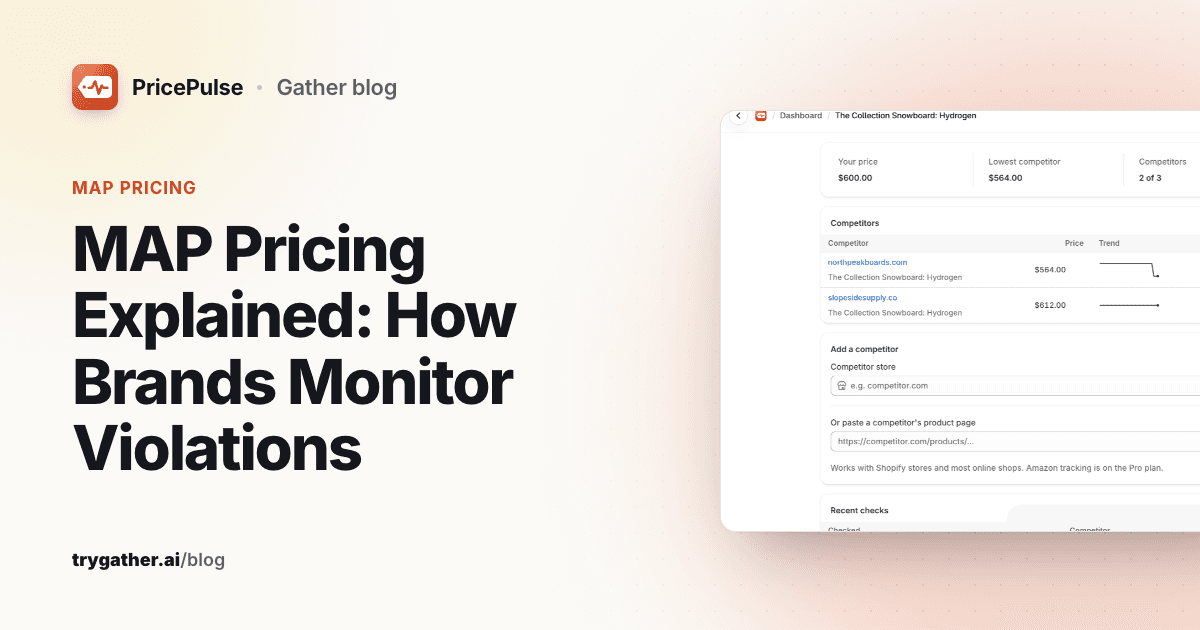
- You attach reseller product pages to each of your Shopify products. (The app calls them "competitors", which is why that word appears in the screenshots below.) Either paste the product URL (Shopify stores, including variant URLs, and most online shops) or enter a reseller's Shopify store and pick the matching product from its catalog. Amazon listings are supported on the Pro plan.
- It checks those pages on a schedule (weekly on the free plan, up to every 6 hours on Pro) and saves every reading, with price, currency and stock status, to a history per reseller.
- It alerts you on price drops and rises above a minimum-change percentage you set, and when a reseller goes out of stock or back in stock.
- It shows your price next to the lowest reseller, with an "undercut" alert when a reseller's price moves from at or above yours to below it.
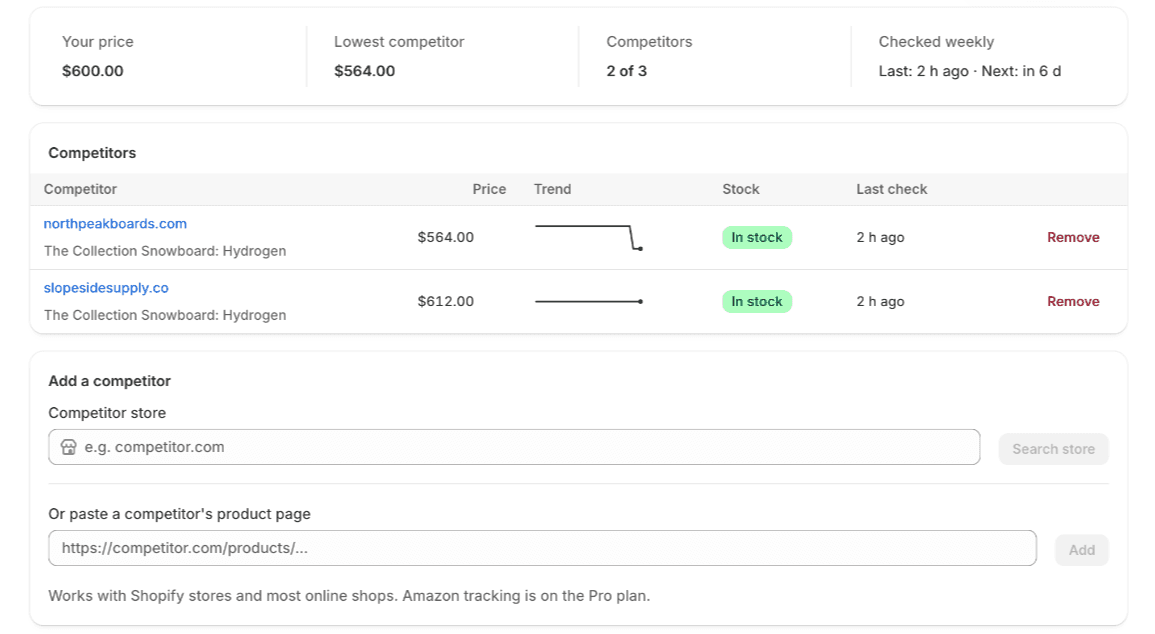
A few things to know before relying on it for MAP:
- The undercut alert compares against your own store price, not a MAP field. If your Shopify store sells the product at exactly MAP, an undercut alert means a reseller has gone below MAP. If you sell above MAP, use the price-drop alerts and the side-by-side table, and compare against your MAP list.
- Set the alert threshold to 0 for MAP work. Undercut alerts only fire together with a price move that meets the "Only alert when a price moves by at least (%)" setting, which defaults to 1%. A reseller that moves from $160 to $159 has moved about 0.6%, so at the default setting no alert fires even though that's a violation. Setting the threshold to 0 in Settings makes every price change count.
- "Your price" is your product's first variant. If a reseller URL is a different size or colour with its own MAP, the undercut comparison uses the wrong baseline. For variant-level MAP, rely on the price table and the drop alerts.
- Checks run on your plan's schedule for every product. There's no per-SKU cadence, but each product page has a "Check prices now" button for on-demand checks during sale weeks.
- The first check is a baseline. A reseller that is already below your price or MAP when you add them won't trigger a drop or undercut alert, but you'll see their price in the comparison table straight away.
- It reads the price published on the product page. Cart-only prices, coupon codes and Google Shopping ads still need a manual check. On Amazon it records the listing price but not which seller holds it, so note the seller name yourself. Keep your own screenshots for notices.
- It never changes your prices and doesn't contact resellers. Enforcement stays with you.
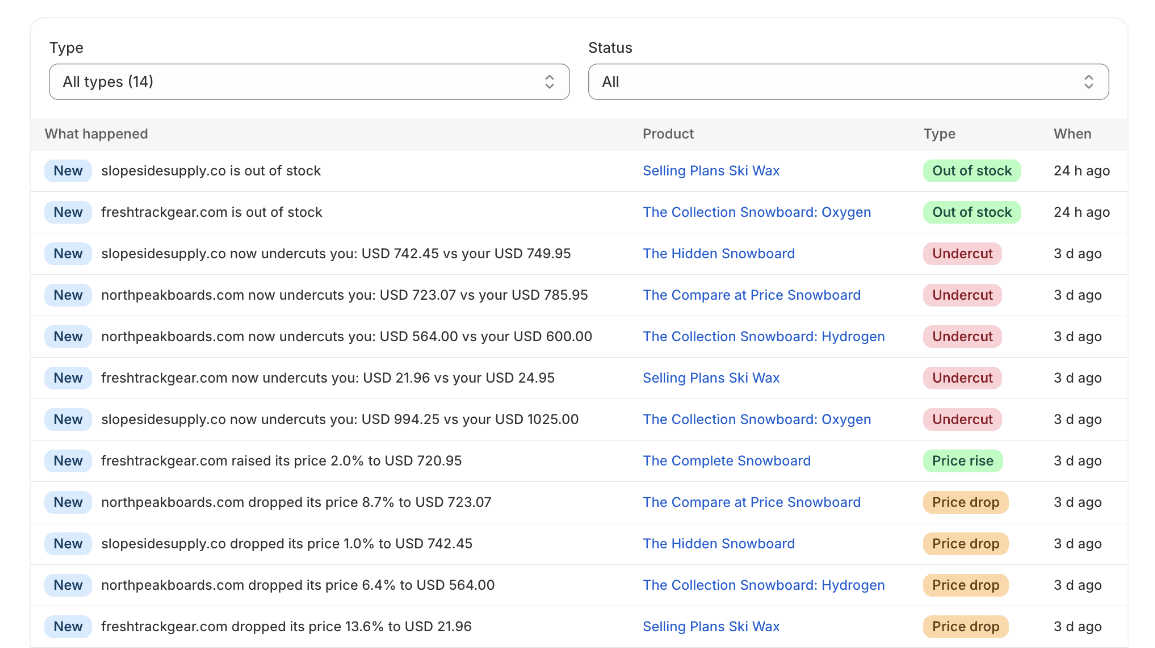
If you're also tracking true competitors (other brands, not your resellers), the setup is almost the same. Our guide on how to monitor competitor prices covers matching products and choosing what to track.
A one-page MAP monitoring checklist
- MAP price list with version number and effective date
- Written policy reviewed by a lawyer, including what counts as "advertised"
- Sheet mapping every covered SKU and variant to each reseller URL
- Check cadence set, tightened for big sale weeks
- Price history and screenshots stored for every finding
- Triage step before any notice (current list, approved promo, authorized seller, right variant)
- Standard notice template and a re-check date
- Outcome logged per reseller, with the same treatment for the same violation
MAP pricing isn't complicated to define. The hard part is doing the checking, week after week, without letting it slide. Get the SKU-to-URL map right, keep dated evidence, and treat every reseller the same way. For a Shopify brand with a small reseller network, that's enough to run a credible MAP program.
Frequently asked questions
What does MAP stand for?
MAP stands for minimum advertised price. It is the lowest price a brand allows authorized resellers to show in ads, on product pages and in other public promotion. It limits the advertised price, not necessarily the price a customer finally pays.
Is MAP the same as MSRP?
No. MSRP (manufacturer's suggested retail price) is a recommendation, and resellers can go above or below it without consequence. MAP is a floor on the advertised price, set out in a written policy that the brand enforces. Many brands set MAP at or a little below MSRP.
Is MAP pricing enforceable?
In the US, many brands run MAP as a unilateral policy: the brand announces it and decides for itself whether to keep supplying a reseller that ignores it. Since the Supreme Court's 2007 Leegin decision, federal courts review minimum resale price arrangements under the rule of reason, but some state laws and other countries treat them more strictly. How you word and enforce the policy matters, so get advice from a lawyer before you put one in place.
How does MAP work on Amazon?
Don't expect Amazon to enforce your MAP policy for you. A MAP policy is between you and the resellers you supply, and sellers on Amazon set their own prices. Watch Amazon listings the same way you watch any other reseller: record the advertised price and the seller's name, keep a dated record, and follow your own policy with that seller.
Can I use MAP if I only sell direct on Shopify?
Not in any meaningful way. A MAP policy sets rules for resellers, so it only applies once other stores sell your product, for example through wholesale accounts, distributors or marketplace sellers you supply. If you sell only through your own Shopify store, you already control your advertised price. MAP becomes relevant the day you open your first wholesale account.
How often should I check reseller prices for MAP violations?
Match the check frequency to how fast prices move. Daily checks cover most brands. Check more often around big sales like Black Friday and Prime Day, when prices change within hours, and weekly is usually enough for slow-moving catalogs with a handful of resellers.